How to create a dynamic QR code
Generate a dynamic QR code for any Smart Link. Because the QR encodes the short URL, the printed code inherits your geo, device and OS routing, blocking, A/B and scheduling — and you can restyle it any time without reprinting.
Every Smart Link comes with a dynamic QR code — one you can restyle, brand and, crucially, edit after printing. Because the code encodes the short link rather than a fixed URL, you can change where it points without reprinting a single sticker, poster or business card.
- 1
Open the QR Codes hub
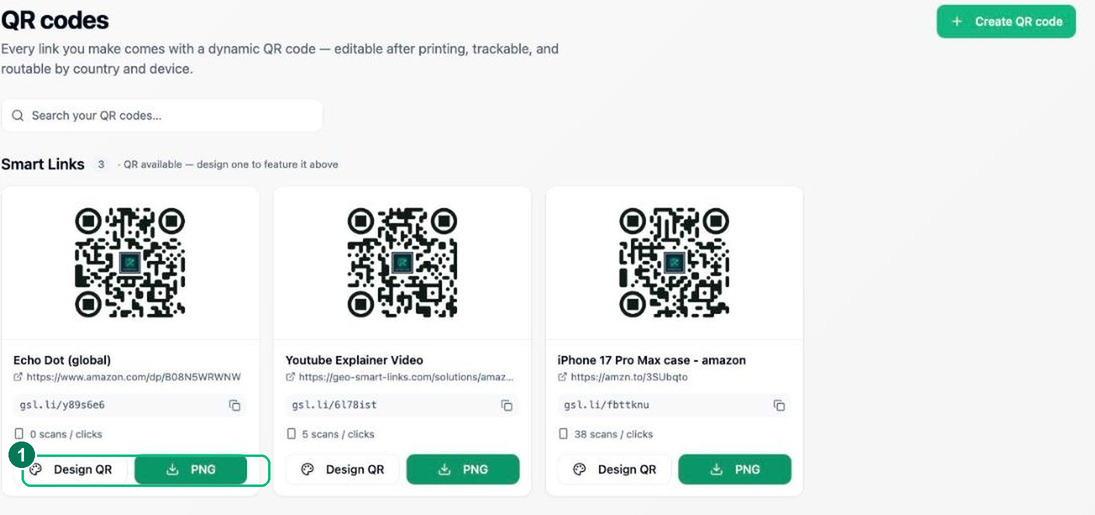
Click QR Codes in the sidebar to see a QR code for each of your Smart Links. Because the code points at the
gsl.lishort URL, scanning always runs your live routing rules — change the link’s destinations later and the same printed code keeps working.- 1 — Generate / open the QR designer for a link.
- 2
Design and brand your code
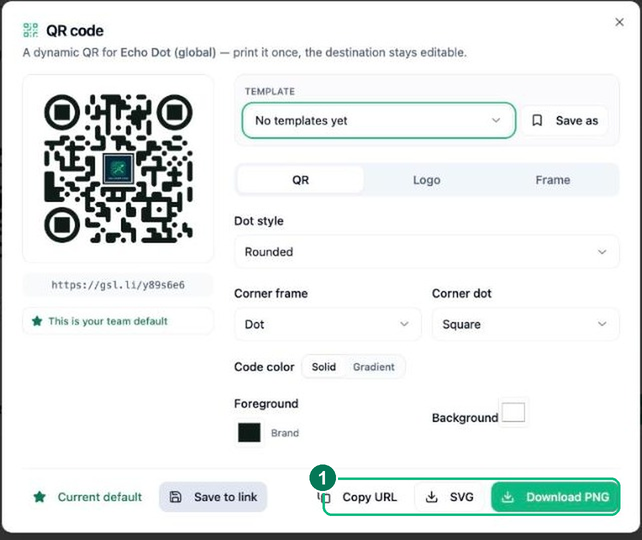
In the designer, pick colours, a dot style, a frame and (optionally) a centre logo. Keep enough contrast for reliable scanning. A live preview updates as you go.
- 3
Download for print or screen
Download your code as a PNG for most uses or an SVG for crisp large-format print. Add it to packaging, flyers, slides or a shop display — scans route exactly like clicks on the link.
- 1 — Download PNG / SVG.
Frequently asked questions
Can I change a QR code’s destination after printing it?
Yes — that is what makes it dynamic. The printed code encodes your short link, so editing the link’s destination updates every copy already out in the world, instantly and with no reprint.
Does the QR code inherit my link’s routing?
Yes. A scan is simply a click, so the same country, device and app rules apply — one printed code can send each scanner to the right destination for them.
Can I brand the QR code?
Yes. The designer lets you set brand colours, dot and corner styles, drop a logo in the centre and add a “scan me” frame, then export a print-ready PNG or a scalable SVG.