How to route a Smart Link by device & OS
Send iPhone visitors to the App Store, Android visitors to Google Play, and desktop users to your website — all from one Smart Link. Add device and operating-system rules in the link builder; an OS match beats a device-type match, and country rules still take priority.
Beyond country, a Smart Link can branch on device and operating system — send iPhone users to the App Store, Android users to Google Play, and desktop users to your web page, all from one link. Device rules stack on top of country rules, so you can get as specific as you need.
- 1
Open the create form and expand “Device & OS redirects”
From your dashboard click + New link, add your Default URL and Title, then under Advanced options open Device & OS redirects.
- 2
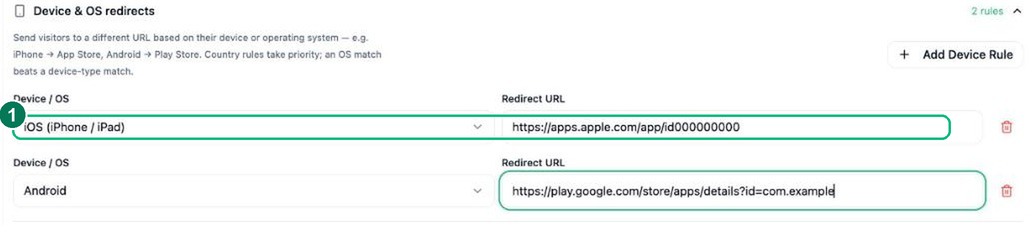
Add a rule for each device or operating system
Click + Add Device Rule, pick a target and paste the URL those visitors should get. You can match an operating system (iOS, Android, Windows, macOS, Linux) or a device type (mobile, desktop, tablet).
- 1 — A device / OS rule, e.g. iOS → App Store and Android → Google Play. Anyone who doesn’t match a rule gets your Default URL.
- 3
Create your Smart Link
Click Create Smart Link and share the one link — each visitor is sent to the right place for their device automatically. Priority order: country rule → OS match → device-type match → Default URL.
Frequently asked questions
Can I combine device routing with country routing?
Yes. Rules stack, so you can send US iPhone users one place and UK Android users another. The most specific matching rule wins, with your Default URL as the catch-all.
What devices and systems can I target?
You can route by device type (mobile versus desktop) and operating system (iOS versus Android) — ideal for app-install links, platform-specific offers, and sending each visitor to the right store.
Do I need separate links for iOS and Android?
No — that is the whole point. One Smart Link detects the operating system on each click and sends iPhone and Android users to their respective app stores automatically.