How to read your link analytics
Read your click data in the Analytics dashboard — total vs human vs bot clicks, country and device breakdowns, routing outcomes, peak hours and per-variant A/B results — then export it to CSV, Excel or PDF.
Your analytics show what actually happens after people click — total and human clicks, a breakdown by country, device and operating system, A/B and rotation outcomes, and which links pull the most traffic. Bots are filtered out, so the numbers reflect real people, not noise.
- 1
Open Analytics and read the summary
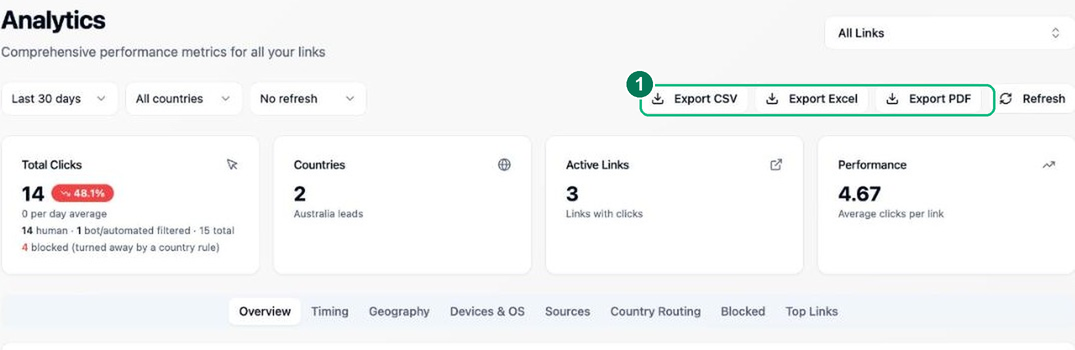
Click Analytics in the sidebar. The summary cards show total clicks (with the human vs bot/automated split and how many were blocked), unique countries, active links and average performance. Use the date-range, country and link filters at the top to narrow things down.
- 1 — Export CSV / Excel / PDF for the current filters (see step 3).
- 2
Explore the breakdowns
Switch tabs to dig in: Geography (clicks by country), Devices & OS, Sources (where clicks came from), Country Routing (geo-routed vs default vs blocked), Blocked, Timing (peak hours and days) and Top Links. If a link uses A/B rotation, you’ll see per-variant clicks here too.
- 3
Export your data
Use Export CSV for a flat, machine-readable table of every click event (UTC timestamps, country, device/OS, A/B variant and more), Export Excel for a multi-sheet workbook (raw events plus summary sheets), or Export PDF for a shareable, branded report. Exports always respect the filters and date range you’ve set.
Frequently asked questions
Why are my reach figures lower than the raw click count?
Reach shows human clicks with bots filtered out, so it is usually lower — and more honest — than raw hits. Your plan limits and any overage are measured on total clicks, which you can also see in the dashboard.
Can I see which countries and devices my clicks come from?
Yes. Analytics break every link’s clicks down by country, device and operating system, so you can see exactly which markets and platforms are driving traffic and where to focus.
Can I export my analytics?
Yes. You can export your click data to CSV as flat rows with country, device, OS and A/B-variant columns in UTC, ready to analyse in a spreadsheet or feed into your own reporting.