How to manage your team
Invite collaborators to your workspace, set their role, and manage who can access your Smart Links. Your plan sets how many members you can add — the owner doesn’t count towards the limit.
Team workspaces let you invite people to help manage your links under one account — ideal for agencies, co-creators or anyone who would rather not share a single login. The owner keeps control of billing and seats, while members get to work on the links.
- 1
Open the Team page
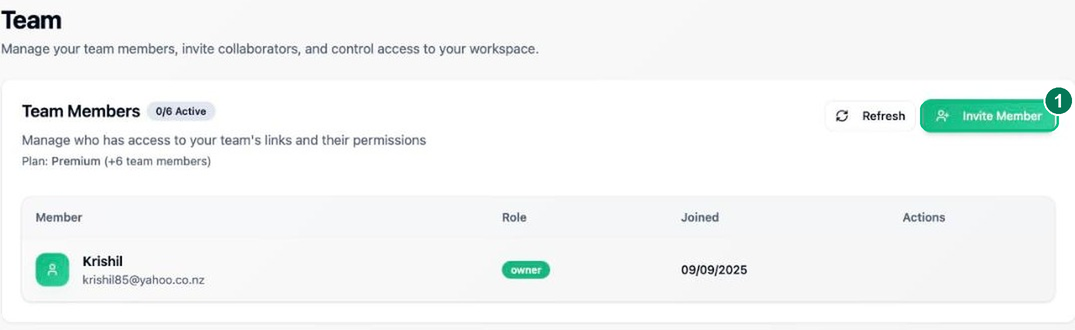
Click Team in the sidebar. You’ll see your current members, their roles and when they joined, along with how many seats your plan allows.
- 1 — Invite Member to add a collaborator.
- 2
Send an invitation
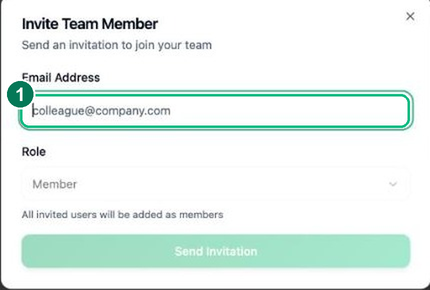
Click Invite Member, enter the person’s email address, choose their role, then click Send Invitation. They’ll receive an email with a link to join your workspace.
- 1 — Email address of the person you’re inviting.
- 3
Manage members and limits
Back on the Team page you can see pending invitations (resend or cancel), and remove members you no longer need. Your plan sets the maximum number of members excluding you — upgrade your subscription to add more seats.
Frequently asked questions
How many team members can I add?
It depends on your plan — each paid tier includes a set number of member seats, and the owner does not count toward that limit. You can see and manage seats on the Team page.
What can team members do?
Invited members can create and manage links in the shared workspace. Billing, plan changes and seat management stay with the account owner.
What happens to a member’s links if I remove them?
The links stay in the workspace — they belong to the team, not the individual — so removing a member never breaks, deletes or orphans the links they created.