How to manage your subscription and billing
See your current plan, click usage and next billing date, turn on overage billing with a spend cap, upgrade or downgrade, and cancel — all from the Subscription page.
Your subscription, invoices and plan changes all live in one place. You can upgrade, downgrade, update your card, or check exactly what you are using against your plan’s limits — no surprises.
- 1
Open the Subscription page
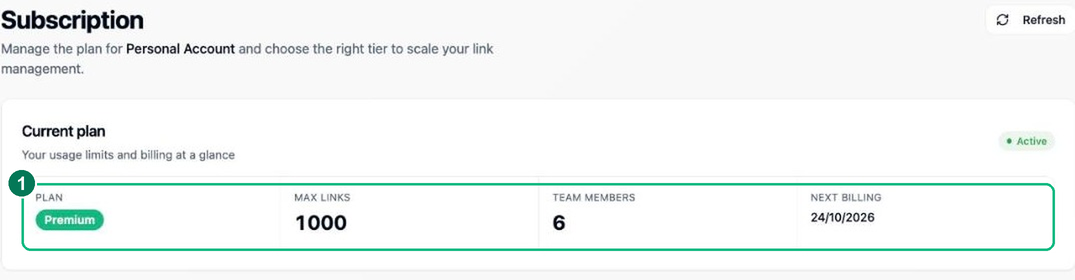
Click Subscription in the sidebar to see your current plan at a glance — its link limit, team-member allowance and your next billing date.
- 1 — Your current plan, its limits and your next billing date.
- 2
Check your click usage
The click usage bar shows this period’s clicks against your plan limit, with the split between real visitors, bots and country-blocked clicks. Plan limits and overage are billed on total clicks; your Analytics report shows the human count separately.
- 3
Overages, upgrades and cancelling
Turn on Allow overages beyond plan limit and set a monthly spend cap so links keep working without a surprise bill — once the cap is hit, charges stop accruing. To change tiers, pick a plan and complete the secure Stripe checkout; to cancel, use the Stripe customer portal — your plan stays active until the end of the current period, then reverts to Free.
Frequently asked questions
What happens if I go over my plan's click limit?
You get a grace buffer first, after which extra clicks are billed in small blocks with a spend cap you control — your links keep redirecting throughout. If overage becomes regular, upgrading to a higher allowance is usually cheaper.
Can I change plans at any time?
Yes. Upgrade or downgrade whenever you like; changes take effect immediately and billing is prorated. A downgrade keeps your links, though some may be paused if you exceed the new plan’s limits.
What happens if a payment fails?
There is a grace period before any link is suspended, and you are notified so you can update your card. Nothing is deleted — once payment goes through, everything resumes exactly as it was.