How to claim a branded subdomain
Paid teams can claim a branded short domain like yourbrand.gsl.li so every short link carries your name. It runs on our own infrastructure with strict per-team enforcement — no DNS setup and no customer-owned domain required.
A branded subdomain puts your name on the short link itself — yourbrand.gsl.li instead of plain gsl.li — so every link you share is recognisably yours. There is nothing to register and no customer-owned domain required.
- 1
Open your branding settings
Branded subdomains are available on the Standard and Premium plans. Open your Team / branding settings to find the branded-subdomain picker.
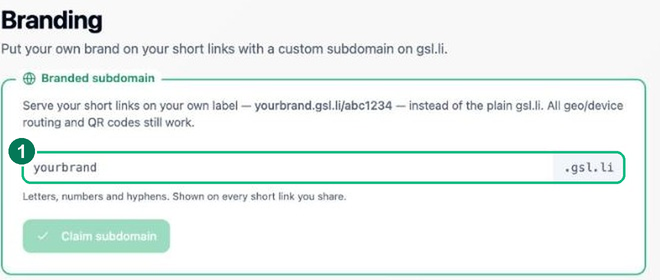
- 1 — Enter and check your subdomain.
- 2
Choose and claim your subdomain
Type the brand label you want — e.g.
yourbrandforyourbrand.gsl.li— and the page checks availability live. Claim it once it’s free. There’s no DNS to configure; it’s served on our own short domain. - 3
Use it on your links
New and existing short links can use your branded subdomain, so visitors see
yourbrand.gsl.li/codeinstead of the generic domain. Routing, QR codes and analytics all work exactly as before.
Frequently asked questions
Do I need to buy a domain?
No. A branded subdomain lives on our gsl.li short domain (yourbrand.gsl.li), so there is nothing to register, configure or renew — you simply claim your brand name.
Which plans include a branded subdomain?
It is a paid feature on the higher tiers. Once claimed, your team’s links are served from your branded subdomain with strict per-team enforcement.
Can I use my own domain instead?
Not a customer-owned domain — the focus stays on what links do (routing, deep-linking, analytics). The branded subdomain gives you an on-brand short link without any DNS setup.