How to block countries on a Smart Link
Stop visitors from specific countries reaching an offer that isn’t available or allowed in their region. Block individual countries or whole regions in one click, and choose what blocked visitors see — a hosted “not available” page or your own URL.
Sometimes the goal is not to redirect a country but to keep it out — for licensing, compliance, or to stop traffic you cannot monetise. Blocking lets you stop clicks from chosen countries and send them to a safe fallback instead, while the rest of the world is unaffected.
- 1
Open the create form and expand “Blocked countries”
In the link builder, open Advanced options and expand Blocked countries.
- 2
Choose who to block and what they see
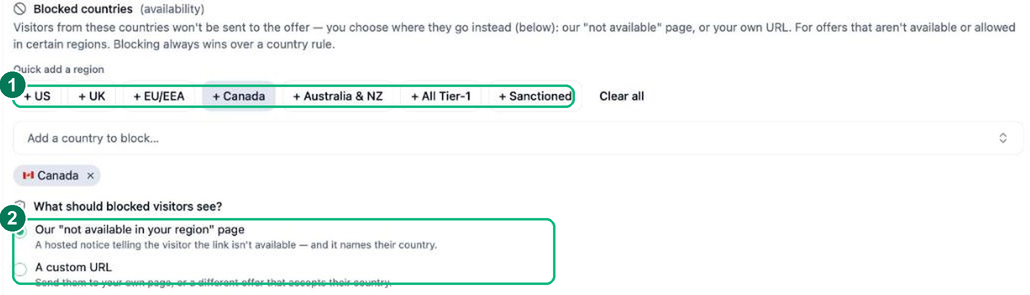
Use the quick-add region buttons (US, UK, EU/EEA, Canada, Australia & NZ, All Tier-1, Sanctioned) or search for individual countries, then choose what blocked visitors see.
- 1 — Quick-add a region, or add countries one by one.
- 2 — What blocked visitors see: a hosted “not available in your region” page, or your own URL.
Blocking always wins over a country redirect rule.
- 3
Create your Smart Link
Click Create Smart Link. Visitors from blocked countries are sent to your chosen fallback instead of the offer.
Frequently asked questions
What do blocked visitors see?
You choose — either a blocked-notice page or a fallback URL you set — so a blocked click never dead-ends. Only the countries you pick are affected.
Why would I block a country?
Common reasons are regional licensing or legal restrictions, content that is not available in a market, or filtering out traffic that cannot convert. It is a compliance and quality tool rather than a redirect.
Can I block and redirect on the same link?
Yes. Blocking is just another rule — you can route some countries to local destinations and block others, all on a single Smart Link.